Fire Vocal Presets by Monakai Audio
"A vocal plugin so clean, so simple, and so good-looking that Kai can’t believe his eyes."
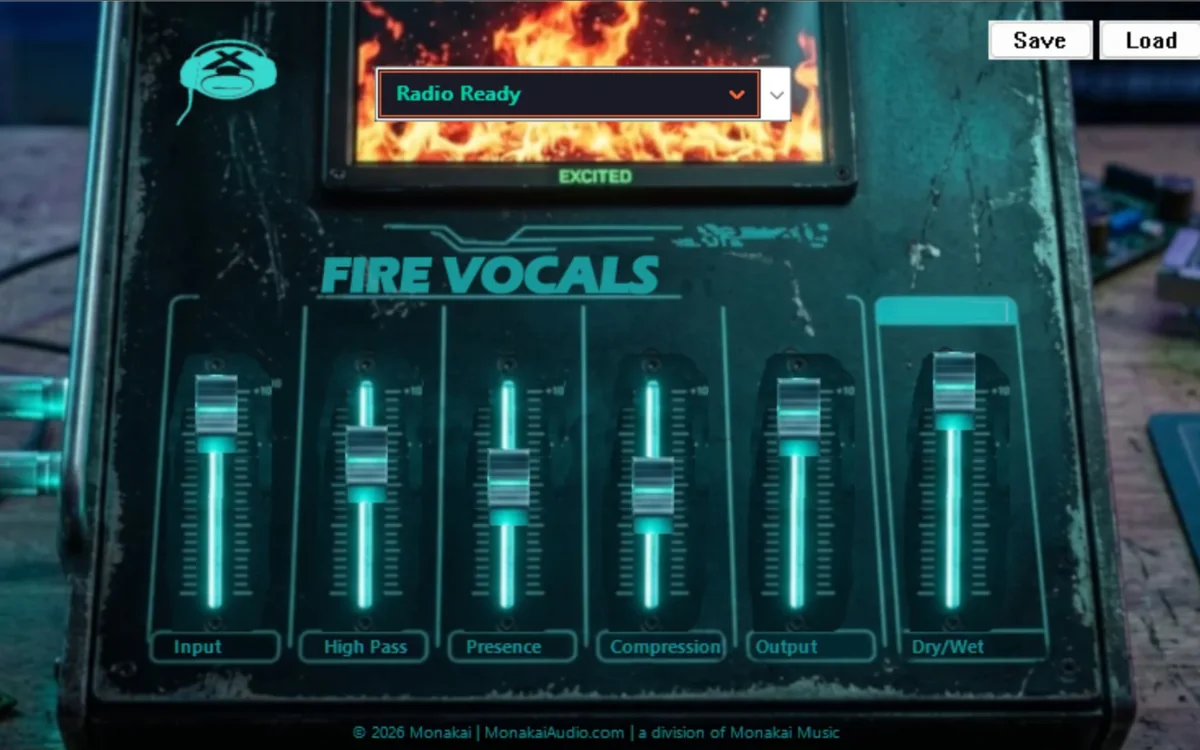
Fire Vocal Presets is a uniquely designed VST3 vocal channel strip. Monakai came correct with an interface like nothing you have seen before — fiery faders, intuitive controls, and a sound that sits in the mix with little to no effort. Just plug it in and hear it for yourself.
Fire Vocal Presets by Monakai runs in Ableton Live, FL Studio, Reaper, Cubase, Studio One and every major Windows DAW. Lock in the Day One price on Monakai Audio.
Start with a 7-day free trial, or lock in the Day One price now. Windows 10/11 VST3.
Kai can’t believe his eyes
When Kai first saw the Fire Vocal Presets interface, he said one word: WOW! It is not just a pretty face — every fader, every preset, and every detail is built so you can dial in great vocals without touching a dozen plugins.
- 10 researched factory vocal presets
- High-pass filter (20 Hz – 500 Hz)
- Presence peaking EQ around 3 kHz
- Smooth feedforward compression
- Input and output gain staging
- Dry/wet blend for parallel processing
- One-of-a-kind Monakai interface design
- 7-day free trial + GWMS license support

"WOW! It looks awesome AND it sounds amazing."
Get Fire Vocal Presets now
Buy the permanent license for $26.99 (Day One price) or start with the 7-day free trial. Your license key is delivered by email immediately after purchase.
Windows 10/11 VST3. Standard price after Day One launch window is $99.99.Factory Presets
Radio Ready
Tight low end, gentle compression, small presence lift for polished vocals.
Warm Tube
Vintage warmth with a low cut, subtle compression and rolled-off highs.
Bright Pop
Clean and forward with bright presence and fast compression.
Lo-Fi Vox
Aggressive high-pass and reduced highs for a crunchy bedroom sound.
Hype Rap
Hard compression, deep low cut and forward midrange for aggressive rap.
Acoustic Singer
Transparent compression and natural presence for honest acoustic vocals.
Podcast / Voiceover
De-ess-friendly presence profile for clear spoken word.
Soul / R&B
Smooth warmth, soft compression and airy presence.
Metal Screams
Tight low cut, aggressive presence and limiting-style compression.
Ad-lib / Doubles
Forward midrange and heavy compression for stacked doubles.
How to Install
- Create a free Monakai Audio account and claim your license.
- Download the installer and run it as Administrator.
- If Windows SmartScreen appears, click More info then Run anyway, or unblock the file first.
- Restart your DAW and scan for new VST3 plugins.
- Insert Fire Vocal Presets on a vocal track and choose a preset.